


Yarn is an abbreviation of “Yet Another Resource Negotiator” and is a package manager of various software programs. The best thing about yarn is that it permits you to share and utilize code securely and rapidly among distinct developers all around the globe.
If you want to create your own software and you are facing difficulty in it then Yarn will help you to use the solution of other developers. When you are using Yarn and there is an existing issue in it then we will report it and when the issue is resolved then you can again use the updated yarn.
Module or package is the means to share a code. The package consists of a code along with all its description in the “package.json” file.
Yarn is considered more efficient and effective than java as it allows other applications including spark to run on the yarn package. Applications of yarn could simultaneously work together in a similar cluster.
The four major components of Yarn is enlisted below:
- Client: Responsible for submitting MapReduce.
- Resource Manager: Responsible for the resources management within the cluster.
- Node manager: Responsible for introducing and monitoring computing containers within the cluster.
- Map-reduce application master: Responsible for checking all the running tasks. Application-master works within the containers and resource manager and node managers are responsible to schedule it.
If you want to use yarn then you must need to install it on your machines. You can install yarn in several ways.
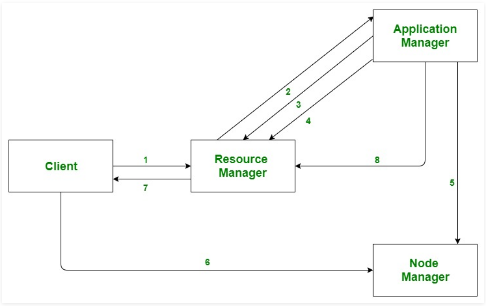
Yarn architecture
First of all, the client sends an application to the resource manager. Then the resource manager has the ability to reserve the container to launch the application manager. Subsequently, the application manager now works with the containers of the resource manager and sends a notification to the node manager. Then the node manager starts the application. Execution of application code is done within the container. The client gets the status of applications either through the resource manager or application manager. When the process is finished the application manager unsubscribes itself from the resource manager. The illustration of yarn architecture is shown below.
Yarn installation through npm
Npm package manager is highly recommended for yarn installation. When you installed npm on your machines then execute the following command in the terminal to install an updated version of Yarn.
Example

Alternative methods to download Yarn
If you want to install Yarn through Chocolatey then first you need to install chocolatey. You can easily download this package manager from its official website.
When you successfully installed chocolatey package manager on your machines. Then check your machine whether node.js is installed already or not. If not, then visit this link https://nodejs.org/en/ and download from there. Subsequently, execute the following command in the terminal:
Furthermore, you can also install Yarn through Scoop. You can easily download this package from its website. When you successfully installed Scoop on your machines then run the below-mentioned command.
Scoop checks itself whether node.js is downloaded on your system or not. If not, then it offers you to download it efficiently by using a single command as shown below:
There is an alternative method to download yarn for Linux which have the below-mentioned command:
Now we are going to briefly explain some of the common Yarn commands further in the same article.
1. Check Version of Yarn
You can check the version of Yarn in few seconds by using this command as mentioned below:

2. Update Version of Yarn
If you want to update the version of Yarn then execute the following command.

3. Make New Project
Run the below-mentioned command to create a new project.
Whenever you execute the above-mentioned command you have to answer all the questions like the name of the project, version, description of the project, etc then press enter. Now you successfully created your project.
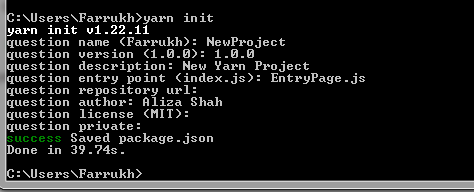
Output

4. Install Dependencies
By using this command, you can easily download all dependencies.
yarn install
Example
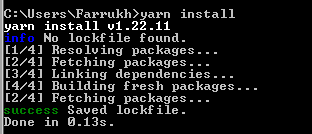
5. Add Dependencies
Run the following command as mentioned below to switch your package. For this, you have to add the package as a dependency.
yarn add [package]@[version]
yarn add [package]@[tag]
When we use these commands then it will automatically add dependencies in the package.json file and it will also modify yarn.lock file accordingly.
Example
In this example, we specify which version of the package we are going to download.

Output

6. Upgrade Dependencies
By using these commands you will easily upgrade dependencies. When we use these commands then it will automatically upgrade dependencies in package.json and yarn.lock file accordingly.
yarn upgrade [package]@[version]
yarn upgrade [package]@[tag]
Example
In this example, we specify which version of the package we are going to upgrade from dependencies.
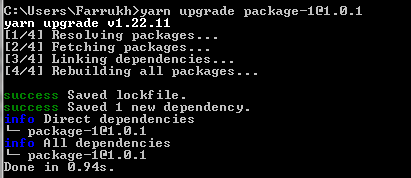
Output

7. Delete Dependencies
By using this command you will easily delete dependency. Package.json and yarn.lock files will be automatically upgraded accordingly.
Example
In this example, we specify which package we are going to remove from dependencies.

Output

Different data processing including interactive processing and stream processing could be done through yarn. It helps to process data which is stored in HDFS “Hadoop distributed file system”. This shows a plus point of yarn.
Conclusion
This article conveys mainly the concept of Yarn. In this article, we learned what yarn is and also the common commands of Yarn along with examples to create a new project and adding/deleting dependencies. If you don’t know about Yarn then you must have a try of these commands.
from https://ift.tt/3vQcsXx


0 Comments