


While purchasing a laptop that performs best in video editing, it is a good idea to enlist your priorities. To know what features you should look for while purchasing the best laptop for video editing in 2021, check the below-given list.
Features of the Best Video Editing Laptops
Here are the essential features you must check in a laptop while purchasing it for video editing:
-CPU: Search for an Intel Core i7 processor, preferably with 4-6 cores.
-RAM: Although many laptops now provide up to 32GB of RAM, the ideal RAM support is still 16GB.
-Storage space: You should invest in a laptop with an SSD because the speed matters a lot while video editing. You can embed your laptop with high-capacity SSDs, which are still expensive. With your laptop, you can utilize an external hard drive for properly managing the storage.
-Dedicated/Integrated graphics: Integrated graphics are adequate for video editing. You should take advantage of good GPUs like the NVIDIA GeForce GTX 1660 Ti and AMD’s RX 5700 XT.
-Display: A Full High Definition (FHD) screen is the basic choice, but if you shoot a video in high resolution, a 4K display is required for editing it in a better way.
-Keyboard: Look for a backlit keyboard having ergonomic key placement and useful shortcuts. You need a better keyboard because video editing applications have some shortcut keys that enhance the workflow and reduce time consumption.
-Lightweight body: If you want to carry your laptop around with you, go for one that weighs between 4 and 5 pounds. However, do not comprise on display or USB ports to achieve this. Any video editing system must have a USB Type-C port or conventional USB 3.1 or 3.0 ports, an SD card reader, and an audio port.
We have compiled a list of the five best laptops for video editing in 2021 that have all of the required specifications taking into account the different budgets and priorities. So let’s begin!
MSI Creator 15
MSI Creator is specially designed for creative work, such as video and photo editing. It has the proper mix of features to earn our recommendation. These features include an Intel Core i7 processor with up to eight cores; an attractive yet professional design, a creative-friendly touch panel; fingerprint reader, a standard IR camera, Wi-Fi 6, and over 10 hours of battery life. It has a well-built metal exterior. This laptop offers a clear image with no distracting reflections. Its extra screen width will be useful for you to track objects in video editing applications like Photoshop. Perhaps the most eye-catching feature of MSI creator 15 is an extra-wide, button-free touchpad. This combination of features is required to be in the best laptop utilized for video editing purposes.

Specifications
| Processor | Intel Core i7-10875H |
| Processor speed | 2.3 GHz |
| Graphics memory | 8 GB |
| Display resolution | 1920 x 1080 |
| Graphic processor | Nvidia GeForce RTX 2070 |
| OS | Windows 10 Pro |
| Screen size | 15.6 inches |
| Weight | 4.63 lbs |
| Touch screen | Yes |
| RAM | 16 GB |
| Battery life | Battery life 10 hours |
| Screen refresh rate | 60 Hz |
Pros
- Supports first-class GPU, 8k video decoding
- Powerful processor
- Bright touch screen
- Front-line display
- VR ready
- SSD with memory option
- Includes fingerprint reader
Cons
- Just one USB Type-A port
- It gets hot under load
Razor Blade Stealth 13
In between other Razor Blade laptop collections, the Razor Blade Stealth 13 brings new components, features, and a few design adjustments. A Core i7-1065G7 CPU is included within this model. It’s the only real 13-inch video editing laptop available, even more captivating is its 120Hz display. Razor Blade Stealth 13 laptop is embedded with an improved Nvidia GeForce GTX 1650 Ti graphics chip. It weighs only 3.1 pounds which declares it a portable device. The screen is of excellent quality, with vibrant, sharp pictures, and the narrow display bezels complete its modern design.

Specifications
| Processor | Intel Core i7 – 1065G7 |
| Processor speed | 1.3 GHz |
| Touch screen | No |
| Display resolution | 1920 x 1080 |
| Graphic processor | Nvidia GeForce GTX 1650 Ti |
| OS | Windows 10 home |
| Battery life | 10 hours |
| Screen size | 13.3 inches |
| Weight | 3.11 lbs |
| Screen refresh rate | 120 Hz |
| Graphics memory | 4 GB |
| RAM | 16 GB |
Pros
- Premium compact design
- USB type -A and -C ports (two for each)
- Improved keyboard layout
- 120 Hz clear display a unique at its screen size
Cons
- The allocated SSD storage is located at the bottom of the laptop.
Buy Razor Blade Stealth 13 on Amazon
Microsoft Surface Book 3
Surface Book 3 by Microsoft makes a strong case for being the ultimate Windows-powered mobile computer; if Microsoft-designed laptops represent the essence of the computing experience in Windows, then the Surface Book is Microsoft’s flagship. It is a detachable 2-in-1 laptop having the best combination of special features, computational power, operating-mode flexibility, and portability of any Microsoft PC. It is the best laptop for those lucky enough consumers to be able to purchase it and use it to its full capability for video editing. Surface Book 3 has powerful graphics processing and a unique mechanical keyboard base locking system. This laptop has multiple cameras and batteries, and you can have a choice of two screen sizes.

Specifications
| Processor | Intel Core i7-1065 G7 |
| Processor speed | 1.3 GHz |
| Screen size | 15 inches |
| OS | Windows 10 |
| Display resolution | 3240 x 2160 |
| Graphic processor | Nvidia GeForce GTX 1660 Ti (Max – Q) |
| Weight | 4.2 lbs |
| Battery life | 13 hours |
| RAM | 32 GB |
| Screen refresh rate | 60 GHz |
| Touch screen | Yes |
| Graphics memory | 6 GB |
Pros
- Powerful graphic processor
- Dual 1080p cameras
- Unique detachable design
- Minimum heat
- Attractive pixel sense display
- Excellent GPU with max Q Technology
Cons
- No buttons on the touchpad
- Expensive
- No Thunderbolt 3 port
Buy Microsoft Surface Book 3 on Amazon
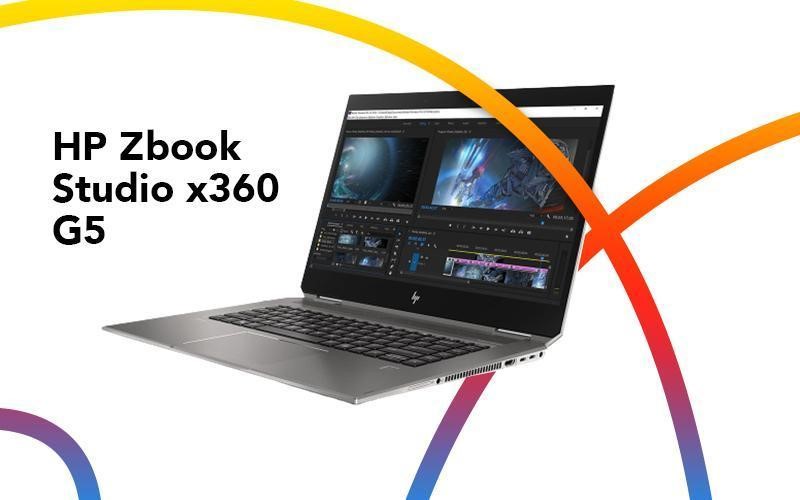
HP Zbook Studio x360 G5
Because of its versatility and portability, the HP Z book 15 G5 is the best laptop that someone can use for editing videos as it features an Intel Xeon E-2186M processor, 2 TB of SSD storage, and 32 GB of RAM. The laptop can take the shape of a tablet. The stylus pen delivers 4096 pressure sensitivity levels thanks to the Quadro4 P1000 digitizer behind the screen pen, permitting its users to edit animations and videos. This HP Zbook laptop also comprises an SD card slot. This laptop also features a full HD dream color panel having a billion colors, a maximum brightness of 600 knits, and Adobe RGB color gamut with 100% coverage, among other features.
Specifications
| Processor | Intel Xeon E-2186M |
| Processor speed | 2.9 GHz |
| Screen size | 15.6 inches |
| Graphics memory | 4 GB |
| OS | Windows 10 Pro |
| Weight | 4.9 lbs |
| Display resolution | 3840 x 2160 |
| Battery life | 10 hours |
| Screen refresh rate | 60 Hz |
| Touch screen | Yes |
| Graphic processor | Nvidia Quadro P1000 |
| RAM | 32 GB |
Pros
- Excellent 4K touch screen
- Two Thunderbolt 3 ports
- Dreamy color display
Cons
- Expensive
- Heavy
- No Buttons on the touchpad
Buy HP Zbook Studio x360 G5 on Amazon
Acer Aspire 5
If you have looked at the families of expensive laptops embedded with fancy features but could not find a laptop that can have a reasonable price and is best for video editing, then meet the Acer Aspire 5. It is a basic, low-cost notebook PC for your general use. It has a speedy AMD Ryzen 7 processor with large storage for a budget-friendly workstation. Acer Aspire 5 laptop has a simple design free from any build flaws. With its basic appearance, fast performance, and feature set, the Acer Aspire 5 is enough for most day-to-day productivity needs. It also has a longer battery life and is cost-effective; that’s the reason behind the fact that this laptop still delivers superb value.

Specifications
| Processor | AMD Ryzen 7 4700U |
| Processor speed | 2 GHz |
| Screen size | 15.6 inches |
| Display resolution | 1920 by 1080 |
| OS | Windows x Home |
| Touch screen | No |
| Screen refresh rate | 60 GHz |
| Battery life | 10 hours |
| Graphic processor | AMD Radeon graphics |
| Weight | 4.1 lbs |
| RAM | 8 GB |
Pros
- Cheapest laptop for video editors
- Higher CPU performance
- Pleasing keyboard with basic backlighting
- Simple design, with no build flaws
- Plenty of ports, including USB Type -C and Ethernet
Cons
- Imprecise touchpad
- Lacks touchscreen option
Conclusion
You can always have the option to easily select the best laptop for video editing if you are a professional. However, an average video editor needs specific details about a laptop before purchasing it from the market. This article discussed the top five laptops for video editing in 2021. Go for the MSI Creative 15 because it provides great creative application performance and is considered one of the best laptops for video editing, photo editing, and music production. In terms of portability, Microsoft Surface Pro 13 is the best laptop. Finally, if you’re looking for a low-cost laptop with all of the necessary video editing features, the Razer Blade Stealth 13 is a good choice.
from https://ift.tt/2OuEovf


0 Comments